# Rewards Design Sizing Guide

## Sizing Guide

This guide outlines the image requirements for each visual component in the Rewards platform, along with links to relevant setup documentation. You'll also find templates to help you get started!

{% hint style="warning" %}
Image sizes across the platform may vary, but we recommend using standard dimensions to ensure consistent rendering and easier maintenance.
{% endhint %}

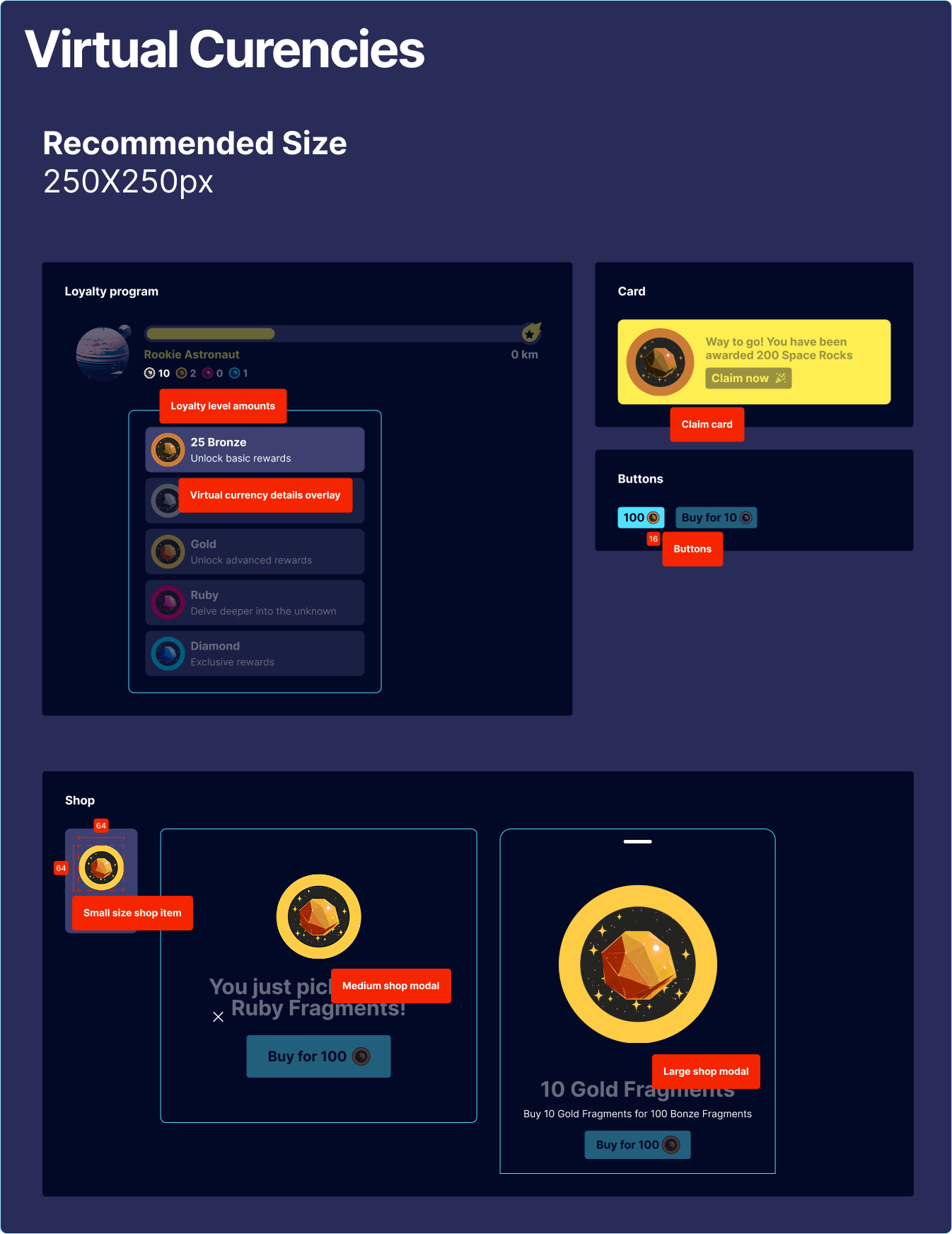
### 🪙 Virtual Currency

Virtual Currency images appear in both the **Rewards Modal** and the **Shop**. These visuals play a key role in making your currency engaging and easily recognisable.

<figure><img src="https://3654650655-files.gitbook.io/~/files/v0/b/gitbook-x-prod.appspot.com/o/spaces%2F-MGrxN2ttYCb8JwJc2TS%2Fuploads%2FAd5lqMoYjYlBQmjLz4gN%2FVC.png?alt=media&#x26;token=7b72d362-076f-42c3-ace2-c046a6d645a4" alt=""><figcaption><p>Recommended Asset Size - Virtual Currency</p></figcaption></figure>

👉 Explore [Virtual Currency](https://www.fasttrack.ai/en/resources/knowledge-base/rewards/virtual-currencies) setup

### 🎁 Bonuses

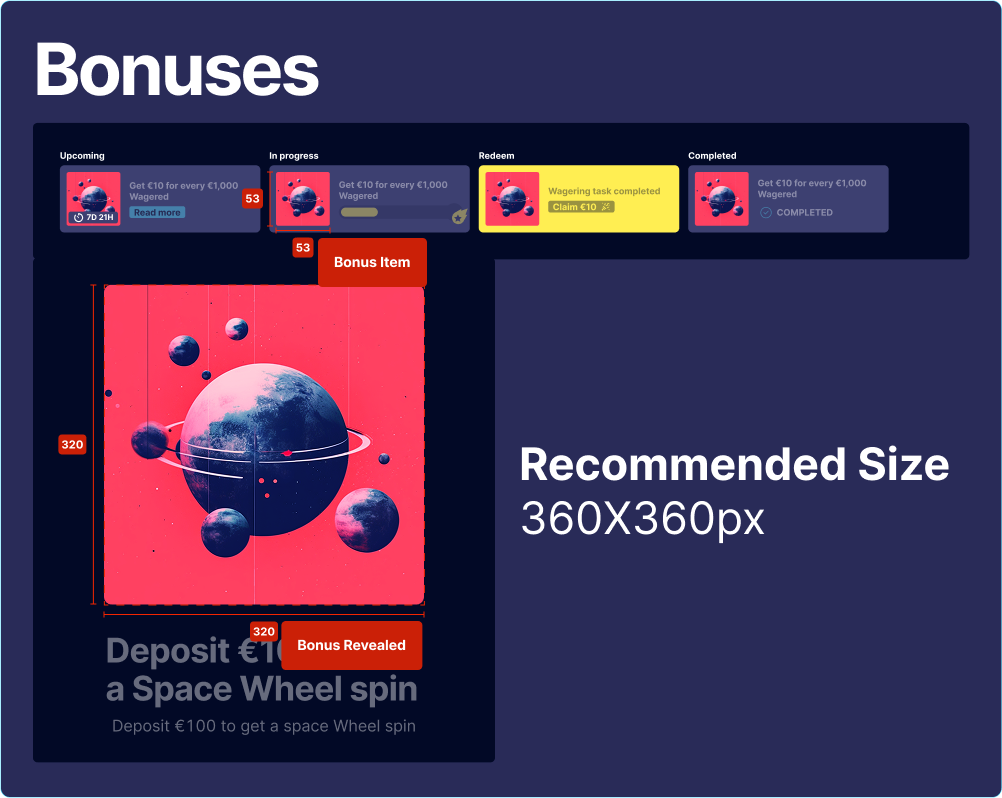
Each Bonus type—**Challenges, Generic Bonuses, Funds Bonuses, Virtual Currency, and Wheel Token Bonuses**—requires an image in the **Appearance Settings**. These images appear wherever players engage with your Rewards program.

<figure><img src="https://3654650655-files.gitbook.io/~/files/v0/b/gitbook-x-prod.appspot.com/o/spaces%2F-MGrxN2ttYCb8JwJc2TS%2Fuploads%2FU2BdkHdtsp3Js2hfpXeV%2FBonus.png?alt=media&#x26;token=1305fbf9-18d8-4d52-932c-6c4de14a31c1" alt=""><figcaption><p>Recommended Asset Size - Bonuses</p></figcaption></figure>

👉 Learn more about [Bonuses](https://www.fasttrack.ai/en/resources/knowledge-base/rewards/bonuses) and [Challenges](https://www.fasttrack.ai/en/resources/knowledge-base/rewards/challenges)

### ⬆️ Levels

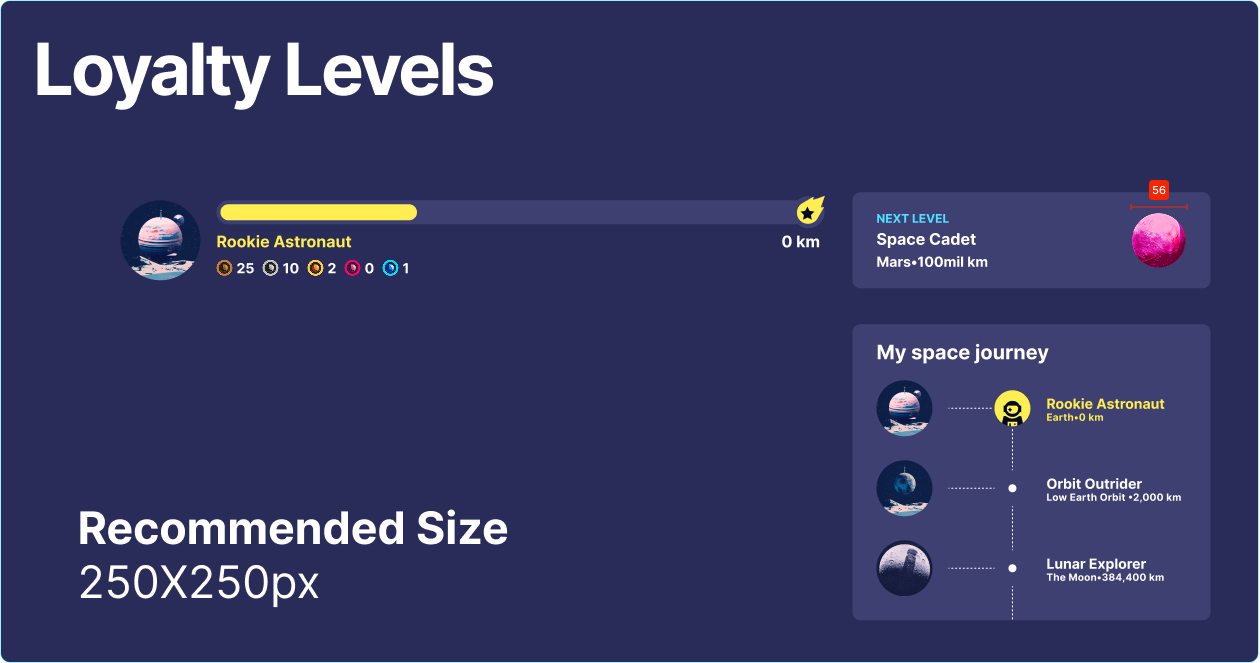
Levels use avatar-style images to represent player progress. Players will see the current and upcoming level avatars in the **Level System** section of the Rewards modal.

<figure><img src="https://3654650655-files.gitbook.io/~/files/v0/b/gitbook-x-prod.appspot.com/o/spaces%2F-MGrxN2ttYCb8JwJc2TS%2Fuploads%2Fvwv8yL5PWFvZCR7Udrak%2FLoyalty%20Levels.png?alt=media&#x26;token=1b4b22bb-ce62-4117-af3a-9b30bd09cfeb" alt=""><figcaption><p>Recommended Asset Size - Levels</p></figcaption></figure>

👉 Learn more about setting up [Levels](https://www.fasttrack.ai/en/resources/knowledge-base/rewards/levels-and-progression)

### 🎯 Wheels

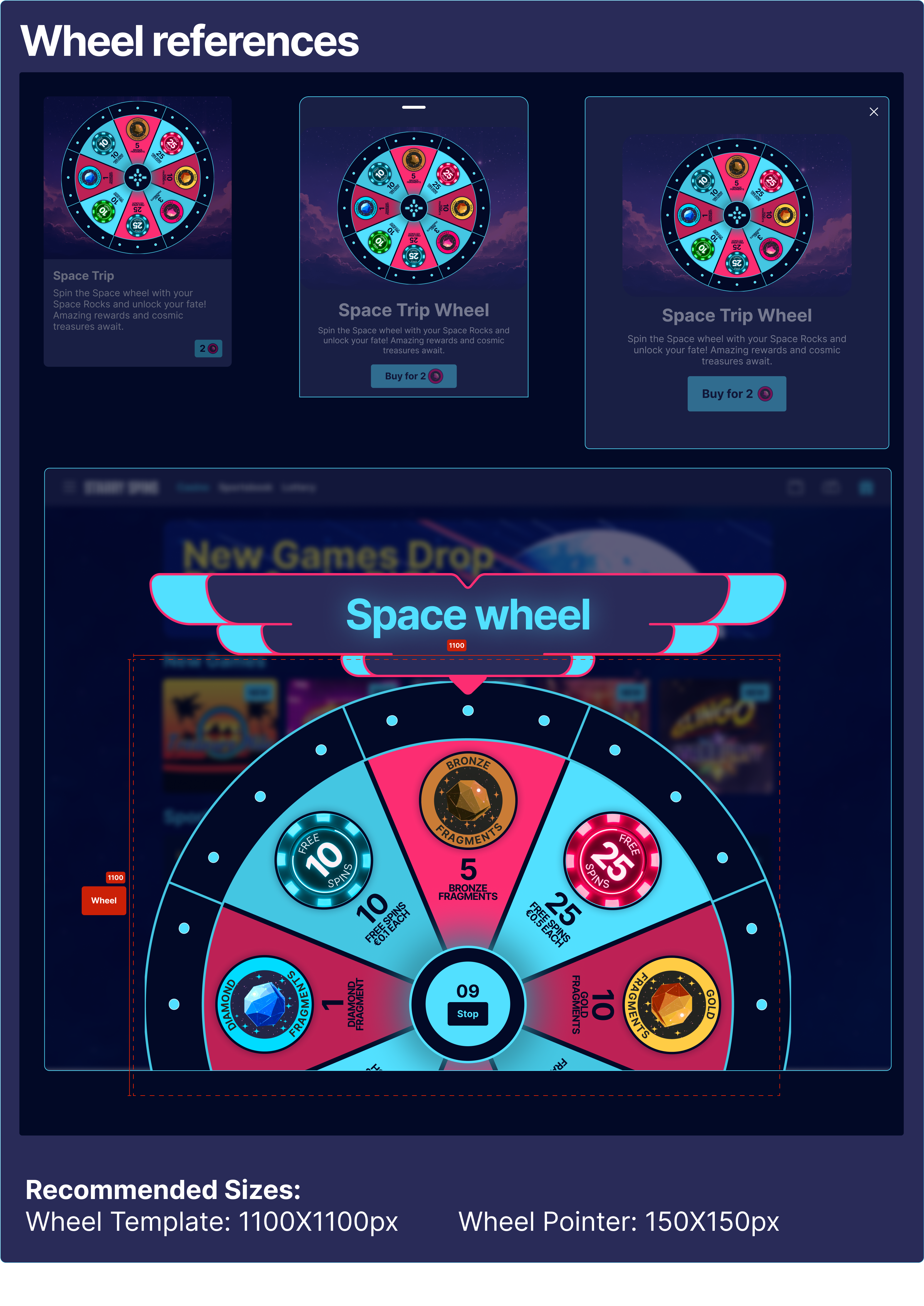
Wheel images define the overall design of your **Rewards' Wheel**. You can upload custom designs for the main wheel and the **Wheel Pointer** to create a fully branded, interactive experience.

<figure><img src="https://3654650655-files.gitbook.io/~/files/v0/b/gitbook-x-prod.appspot.com/o/spaces%2F-MGrxN2ttYCb8JwJc2TS%2Fuploads%2F3n4M3Z0PF05l6KNdQ57h%2Fimage.png?alt=media&#x26;token=9910a71b-51a3-4c1b-811c-a1245a05d110" alt=""><figcaption><p>Recommended Asset Size - Wheels</p></figcaption></figure>

👉 Set up your [Wheel](https://www.fasttrack.ai/en/resources/knowledge-base/rewards/wheels)

### 🛍️ Shop Items

Shop Items should look appealing and inviting—great visuals increase player interest and drive engagement.

<figure><img src="https://3654650655-files.gitbook.io/~/files/v0/b/gitbook-x-prod.appspot.com/o/spaces%2F-MGrxN2ttYCb8JwJc2TS%2Fuploads%2FYvxUOcZtRlwJtFGR65al%2Fimage.png?alt=media&#x26;token=1d2aefea-bdcb-4576-85af-481da449596c" alt=""><figcaption><p>Recommended Asset Size - Shop Item</p></figcaption></figure>

👉 Discover how to create [Shop Items](https://www.fasttrack.ai/en/resources/knowledge-base/rewards/shops/shop-items)

### 📅 Calendars

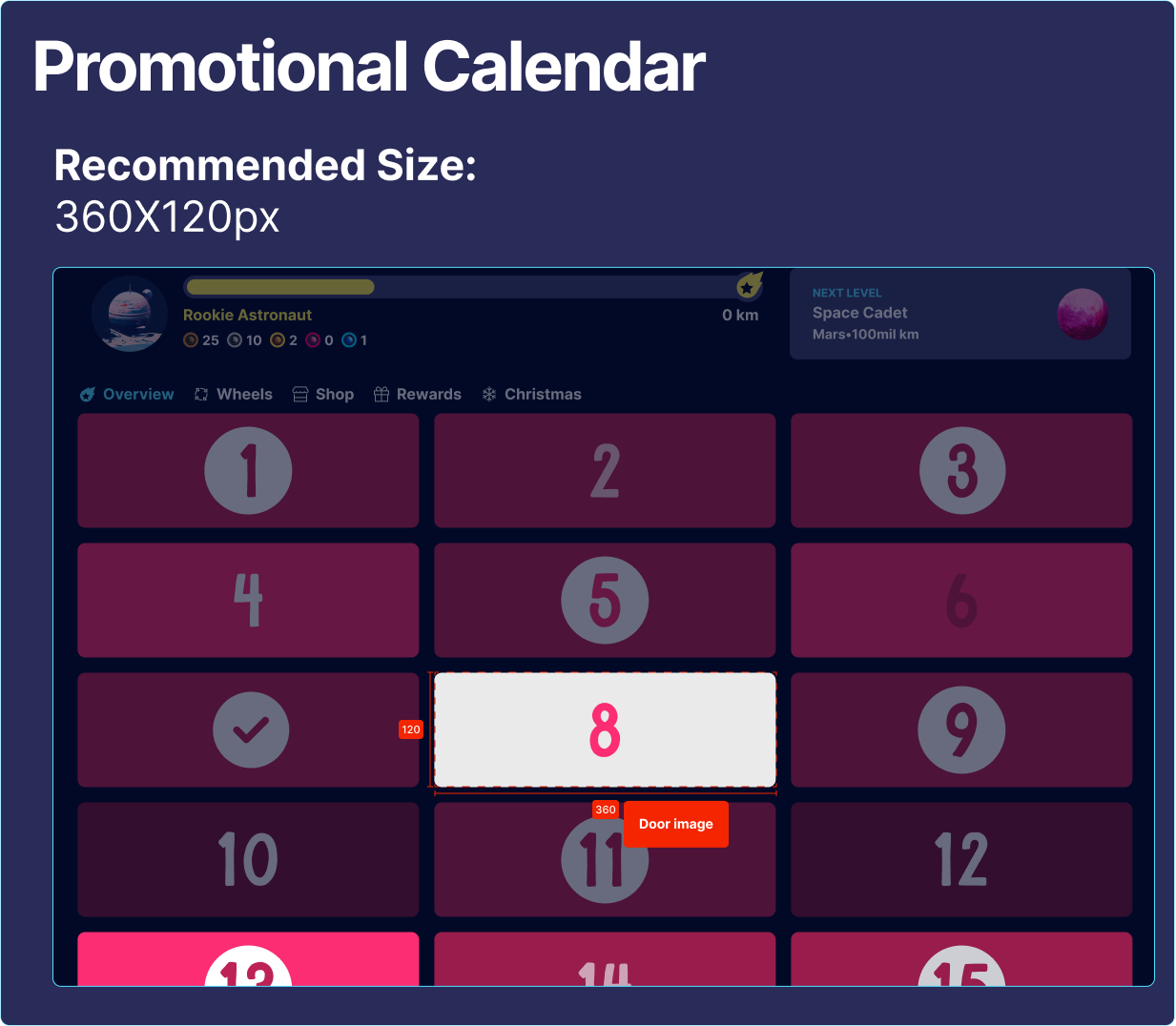
Each **Calendar Door** needs an image, as players click on these doors to reveal hidden bonuses.

<figure><img src="https://3654650655-files.gitbook.io/~/files/v0/b/gitbook-x-prod.appspot.com/o/spaces%2F-MGrxN2ttYCb8JwJc2TS%2Fuploads%2FG3Bhk7yu88qb64twyT8C%2Fimage.png?alt=media&#x26;token=25d424c3-2651-4f0a-91a5-93e6b7d4ded6" alt=""><figcaption><p>Recommended Asset Size - Calendar</p></figcaption></figure>

👉 More on [Calendar](https://www.fasttrack.ai/en/resources/knowledge-base/rewards/promotional-calendars) setup

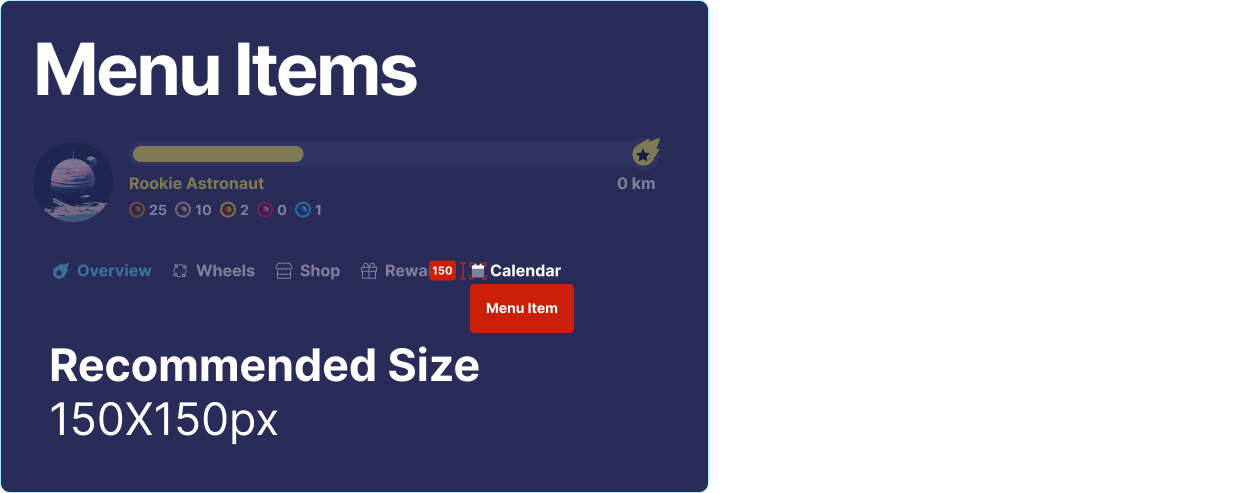
### 📋 Menu Items

Menu Items appear as tabs in the **Rewards interface**. You can use emojis or upload custom icons to match your brand perfectly.

<figure><img src="https://3654650655-files.gitbook.io/~/files/v0/b/gitbook-x-prod.appspot.com/o/spaces%2F-MGrxN2ttYCb8JwJc2TS%2Fuploads%2FXLjTcAHjWAq4uWNLNIvH%2Fimage.png?alt=media&#x26;token=7bee0047-3dca-462d-9700-a725b68ea174" alt=""><figcaption></figcaption></figure>

👉 Manage Menu Items via the [**My Rewards**](https://www.fasttrack.ai/en/resources/knowledge-base/rewards/my-rewards) section.

## Asset Templates

Below are templates for all the asset types mentioned above. Feel free to download them and start experimenting with them in your Rewards setup!

{% hint style="info" %}
Click on the image you want to download, then right-click and select **"Save image as..."** to save it to your device.
{% endhint %}

### All Bonus Types

<figure><img src="https://3654650655-files.gitbook.io/~/files/v0/b/gitbook-x-prod.appspot.com/o/spaces%2F-MGrxN2ttYCb8JwJc2TS%2Fuploads%2FHBkzFYwuoRzeCHJlvBMy%2FChallenge.png?alt=media&#x26;token=19d5f25c-1ea8-487b-8b06-3c33e809576e" alt=""><figcaption><p>320x320 or 360x360px</p></figcaption></figure>

### Calendar Doors

<figure><img src="https://3654650655-files.gitbook.io/~/files/v0/b/gitbook-x-prod.appspot.com/o/spaces%2F-MGrxN2ttYCb8JwJc2TS%2Fuploads%2FeHCBDxaWRkzz9EGTXtyS%2FCalendar%20Door.png?alt=media&#x26;token=f952847a-cb15-4021-9792-d1ff1c3ffb93" alt=""><figcaption><p>360x120px</p></figcaption></figure>

### Level Avatar

<figure><img src="https://3654650655-files.gitbook.io/~/files/v0/b/gitbook-x-prod.appspot.com/o/spaces%2F-MGrxN2ttYCb8JwJc2TS%2Fuploads%2FqmwyBJo11GmaEBd4jIwJ%2FLevel.png?alt=media&#x26;token=4e88437b-f8ac-4dc4-8743-931a63bc5bad" alt=""><figcaption><p>250x250px</p></figcaption></figure>

### Menu Item

<figure><img src="https://3654650655-files.gitbook.io/~/files/v0/b/gitbook-x-prod.appspot.com/o/spaces%2F-MGrxN2ttYCb8JwJc2TS%2Fuploads%2FwHFBerSoU6CnGh4igEPh%2FMenu%20Item.png?alt=media&#x26;token=669b6e92-8388-4b79-9de1-b6d5b339f229" alt=""><figcaption><p>150x150px</p></figcaption></figure>

### Shop Item

<figure><img src="https://3654650655-files.gitbook.io/~/files/v0/b/gitbook-x-prod.appspot.com/o/spaces%2F-MGrxN2ttYCb8JwJc2TS%2Fuploads%2FWU31nRpSxg0Oc7CVAqE2%2FShop%20Item.svg?alt=media&#x26;token=74bb907d-e5af-4fc2-915d-4893611c0253" alt=""><figcaption><p>500x500px</p></figcaption></figure>

### Virtual Currency

<figure><img src="https://3654650655-files.gitbook.io/~/files/v0/b/gitbook-x-prod.appspot.com/o/spaces%2F-MGrxN2ttYCb8JwJc2TS%2Fuploads%2FWJrUyAUdbYimRrRhAkZv%2FVC%20Template.png?alt=media&#x26;token=fe222d71-8ec6-487f-a8ca-2e5ad7d1e707" alt=""><figcaption><p>250x250px</p></figcaption></figure>

### Wheel Pointer

<figure><img src="https://3654650655-files.gitbook.io/~/files/v0/b/gitbook-x-prod.appspot.com/o/spaces%2F-MGrxN2ttYCb8JwJc2TS%2Fuploads%2F3w3dtaqiN0RWjHHY0IrA%2FWheel%20Pointer.png?alt=media&#x26;token=a9658300-412e-491d-88ca-f17fdcdfc048" alt=""><figcaption><p>150x150px</p></figcaption></figure>

{% hint style="warning" %}
Please note that when using the **default** [Wheel settings](https://www.fasttrack.ai/en/resources/knowledge-base/rewards/my-rewards/branding#wheel), the actual rendered size of the pointer image is fixed to **44x44px**.
{% endhint %}

### Wheel Image

<figure><img src="https://3654650655-files.gitbook.io/~/files/v0/b/gitbook-x-prod.appspot.com/o/spaces%2F-MGrxN2ttYCb8JwJc2TS%2Fuploads%2Fv0G6e0VAZ497ksD5hiqh%2FWheel.png?alt=media&#x26;token=dde78777-f787-4f64-af18-aeafde84c8d2" alt=""><figcaption><p>1100x1100px</p></figcaption></figure>